Start your 14-day trial
Test Restorly on your own backups for 14 days, free and without payment details. Every feature is included, for up to 5 databases.
What you need
- A Linux host inside your network, used only for Restorly: 4 vCPU, 8 GB RAM, Docker (details).
- Read access to where your backups already are: a NAS share, an SFTP host, an S3 bucket or a local disk.
- A work email address: we send a 6-digit code to it.
- The host must reach
licence.to start the trial. For a host without internet access, contact us at sales@restorly.eu.restorly. eu
1. Install Restorly
On the host:
curl -fsSLO https://get.restorly.eu/install.sh
less install.sh            # read it first
sudo sh install.sh
sudo usermod -aG docker restorly
sudo systemctl enable --now restorly
With Podman instead of Docker, the service gets Podman's socket instead of the docker group: Getting started shows the commands (choose Podman). The installer prints them too.
The installer checks every signature before it installs anything. Back up the master key it creates, /etc/: without it, stored passwords and the report-signing key cannot be recovered.
2. Open the panel
A new install serves the panel on the host itself only. Let it listen on your network: in /etc/ set listen: 0.0.0.0:8420 under agent:, then reload the service (and open port 8420 in the host's firewall if it has one):
sudo systemctl reload restorlyOpen https:/ (the host's name or address) from your computer. The browser warns about the self-signed certificate; see Getting started.
Create the first admin with a one-time code from the host, then set up two-factor sign-in:
sudo restorly panel setup-code3. Start the trial
The setup wizard opens with Licence. Under Start a free trial, enter your name, work email and company, tick the box to accept the licence terms (having read the privacy policy), and choose Start the trial. From the command line it is restorly license trial --name N --email E --company C --accept-terms. Enter the code we email you and choose Confirm and start the trial: the trial starts at once. Online licensing is on by default; if it was switched off on this host, the step asks you to switch it on first: choose Switch on online licensing, switch on Online licence there and come back to this step.
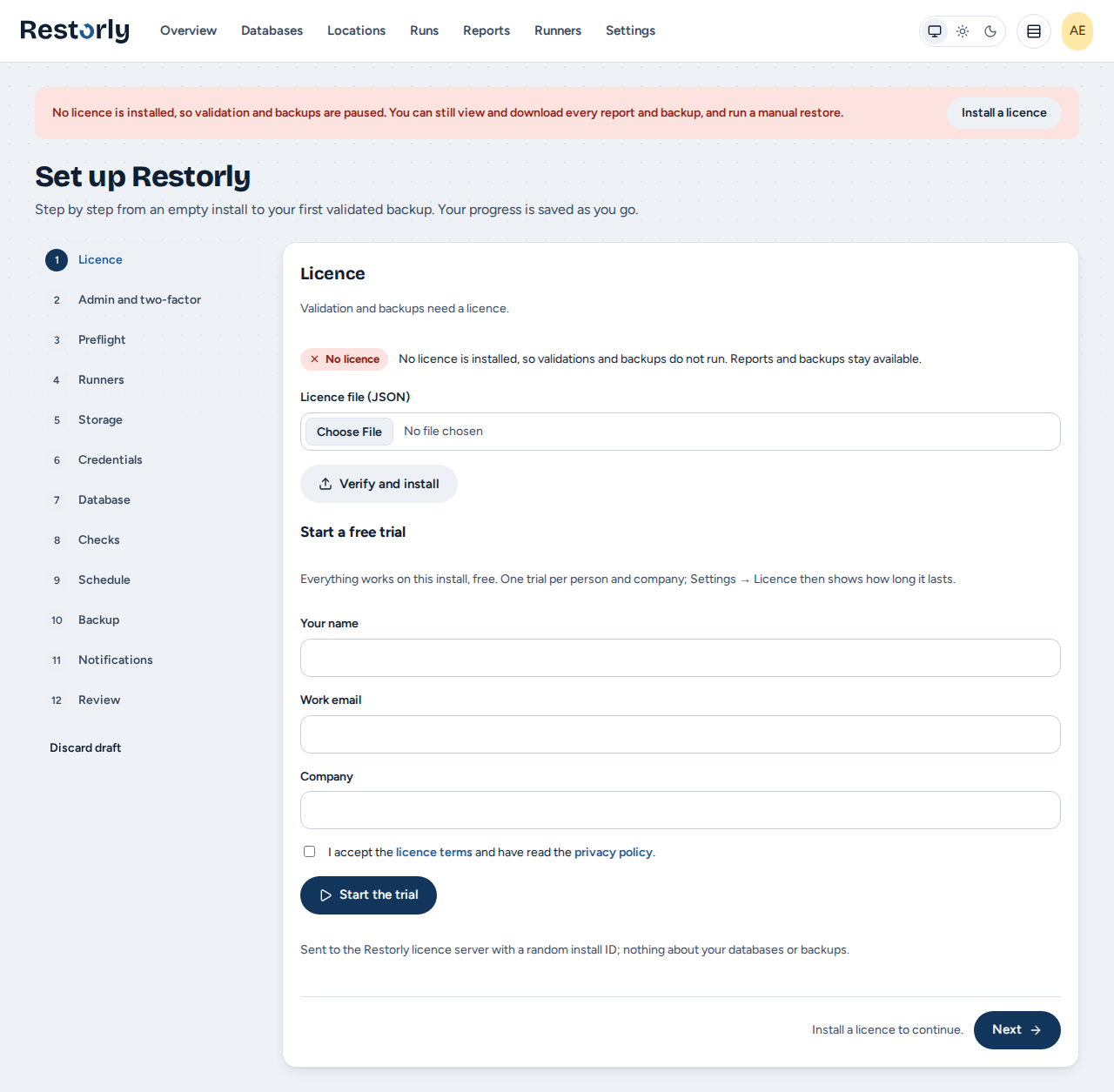
Only your name, email and company go to our licence server, with a random installation ID and that you accepted the licence terms: nothing about your databases or backups. While the trial runs, the host renews its licence once a day (what that sends).
4. Test your first backup
The next steps of the wizard set up your first database: where its backups are, which checks to run and when. Then open the database and choose Run now: Restorly restores the newest backup in a throwaway container, runs the checks and signs the report. Getting started explains every step.
When the trial ends
- The panel shows how many days are left.
- After 14 days, new restore tests and backups stop. Your reports and backups stay available: you can still view, check and export every report, and download or restore your backups.
- To carry on, buy a plan at
licence., then install the licence in Settings → Licence or let online licensing pick it up. Everything you set up stays as it is.restorly. eu - One trial per person, company and installation.